
30 enero 2014


27 diciembre 2013
Understanding networks in vCloud Director - Part 2/2
Read first "Understanding networks in vCloud Director - Part 1/2"
http://virtualshocks.blogspot.com.es/2013/09/understanding-networks-in-vcloud.html

When creating a vApp netork the options are:
-Direct: vApps coonect directly to the organization virtual datacenter network.
-Routed: new network where the router provides NAT and FW functions.
-Isolated: no connections outside de vApp, only inside vApp VM machines can communicate.
-Fenced: Identical virtual machines can exist in different vApps, the virtual router provides isolation and proxy ARP.
Before see some examples, take care with the Network Pool options as defined above:

...Trough the wizard:


...Trough the Networks tab you can sleect the network type ant the NAT or FW options:

Let´s check some examples:


http://virtualshocks.blogspot.com.es/2013/09/understanding-networks-in-vcloud.html
This part 2/2 is about the "vApp networks" on VMware vCloud Director. This vApp networks connect the virtual machines in a vApp, it´s like configure a router in front a vApp to separate the vm´s from the rest of the vApp or the Cloud enviroment.
What VMware says "vCloud Director coordinates with vCloud Networking and Security Manager to provide automated network security for a vCloud environment. vCloud Networking and Security Edge gateway devices are deployed during the provisioning of routed or private networks. Each vCloud Networking and Security Edge gateway runs a firewall service that allows or blocks inbound traffic to virtual machines that are connected to a public access organization virtual datacenter network. The vCloud Director web console exposes the ability to create five-tuple firewall rules that are comprised of source address, destination address, source port, destination port, and protocol."

-Direct: vApps coonect directly to the organization virtual datacenter network.
-Routed: new network where the router provides NAT and FW functions.
-Isolated: no connections outside de vApp, only inside vApp VM machines can communicate.
-Fenced: Identical virtual machines can exist in different vApps, the virtual router provides isolation and proxy ARP.
Before see some examples, take care with the Network Pool options as defined above:

...Trough the wizard:

..Trough the vApp diagram tab in vCloud Director GUI. This view is one of the best way to review the networking configuration issues clicking on a VM the paths are highlighted:

...Trough the Networks tab you can sleect the network type ant the NAT or FW options:

Let´s check some examples:
CASE1: where 2 Organizations keep comunicated with a External Network: vShield Edge routing and statics routes are necessary

-CASE1: where 2 Organizations keep communicated without NAT but where vShield Edge is necessary.
.

LINK: vCloud Networking
22 octubre 2013
VCP5 + VCP-IaaS exam = VCP-Cloud ....examen aprobado!!!
Despues de unas cuantas semanas AWAY FROM KEYBOARD por un maldito latigazo cervical.... retomo la actividad en el blog con muchas ideas en la cabeza y muchos post que publicar :-)
Para empezar el ultimo post que se quedo en el tintero el pasado Octubre, por superar con exito el examen VCP-IaaS con 466 puntos de 500 posibles, el aprobado esta en 300 puntos de 85 preguntas en total :-) obteniendo de este modo la certificacion VCP-Cloud.

Recordatorio del roadmap nuevo de certificaciones:
Mas info: http://virtualshocks.blogspot.com.es/2013/09/new-vmware-certification-roadmap.html

Para empezar el ultimo post que se quedo en el tintero el pasado Octubre, por superar con exito el examen VCP-IaaS con 466 puntos de 500 posibles, el aprobado esta en 300 puntos de 85 preguntas en total :-) obteniendo de este modo la certificacion VCP-Cloud.

Recordemos que la certificación VCP5 ahora se llama VCP5-DCV; y existe una nueva certificacion
VCP-Cloud que puedes obtener o bien presentándote al examen VCP-Cloud o bien aprobando el
VCP-IaaS si ya eres VCP5.

VCP-IaaS si ya eres VCP5.
El examen VCP-IaaS cubre todo lo referente a vCloud: vCloud Director, vShield, vCenter Chargeback, etc
Recomendaciones para superar el examen con exito:
1-Descargar el Exam Blueprint para tener claro que entra y que no en el examen:
2- Realizar los dos cursos recomendados (que no obligatorios):
http://mylearn.vmware.com/mgrreg/courses.cfm?ui=www_edu&a=one&id_subject=38932
http://mylearn.vmware.com/mgrreg/courses.cfm?ui=www_edu&a=one&id_subject=48699
3- Montar un laboratorio con vCenter, vCloud Director y vCenter Chargeback.
4-Practicar "muuuucho" todo lo relacionado con el networking y los diferentes tipos de recursos que se pueden generar, que son el core del examen! Conceptos como External-Routed, vShield, VDC de Organizacion o vDC de Proveedor tienen que quedaros muy claros.
4-Practicar "muuuucho" todo lo relacionado con el networking y los diferentes tipos de recursos que se pueden generar, que son el core del examen! Conceptos como External-Routed, vShield, VDC de Organizacion o vDC de Proveedor tienen que quedaros muy claros.
Recordatorio del roadmap nuevo de certificaciones:
Mas info: http://virtualshocks.blogspot.com.es/2013/09/new-vmware-certification-roadmap.html

11 octubre 2013
VMware & Oracle performance tips on NFS NetApp storage
Los problemas de rendimiento son tediosos de resolver y no siempre tienen su origen donde apuntan las primeras hipótesis cuando alguien destapa la caja de los truenos y se queja del bajo rendimiento de algún servidor virtualizado.
Es muy habitual que por desconocimiento de la virtualizacion, se la culpe siempre en primer termino de todos los males... saber conectarse a un vCenter y crear una maquina virtual "no" es saber de virtualizacion.
Siempre debe realizarse un trabajo conjunto de todas las áreas implicadas. Me explico, un problema de performance de una maquina virtual no es un problema exclusivo de VMware o del virtualizador de turno, es un problema en el que interviene muchos elementos y departamentos como Storage, Networking, BBDD, etc.
La suma de acciones suele generar buenos resultados al final de los analisis de problemas de rendimiento y todos los departamentos suelen enriquecerse de esas experiencias... asumir una mejora no es culparse de un error si no aportar valor y conocimiento ..al hilo de lo cual os recuerdo lo importante de documentar todo lo que podamos "el ser humano es el unico animal que tropieza dos veces en la misma piedra, porque la primera no lo documenta".

Vamos al turrón con 3 puntos básicos que aunque focalizamos en VMware, NetApp y Oracle lo podemos hacer extensible a cualquier entorno virtual, de almacenamiento y de bbdd:
1-Aplicar best practices de NetApp (consultar antes de aplicar con el fabricante):
Foco de atención sobre:
-Revisar configuración del Networking del NFS: uso de VLAN aislando para trafico NFS, misma subnet red NFS servidor y NAS, reducir saltos de red fisica entre el servidor y la NAS, habilitar jumbo frames a nivel de NFS, utilizar tarjetas 10GbE, realizar teaming (vifs & etherchannel) y revisar políticas de balanceo.
-Revisar el alineado de los FileSystem y VM´s.
-Aplicar recomendaciones del plugin NetApp integrado en el vCenter (consultar antes con fabricante)
-Revisar capacidad de IOps de agregados y controladoras (Monitorizar con OnCommand Core)
-Revisar configuración de los agregados: “añadir discos físicos y forzar reallocate”, verificar planificación de la deduplicacion, revisar estado thinprovisioning y espacio libre en NAS, revisar planificación de snapshots, revisar configuración de RAID óptima para mayor rendimiento de VM´s criticas.
- Estudiar opción crear agregados flashpools con SSD.
-Estudiar opción conexión por FC para VM´s criticas.
Documentación relacionada:
NetApp Technology - Monitorización OnCommand-Core
NetApp Storage Best Practices for VMware vSphere
NetApp Technology - Alineación de Máquinas Virtuales
NetApp, Best Practices for File System Alignment in Virtual Environments
NetApp, location of the mbrscan and mbralign tools
Clustered Data ONTAP NFS Implementation Guide
NetApp Data Compression and Deduplication Deployment and Implementation Guide
VMware vSphere 5 on NetApp Clustered Data ONTAP 8.1
NetApp and VMware Virtual Infrastructure 3 Storage Best Practices (uno de los TR mas populares de NetApp)
2-Aplicar best practices de VMware para NFS:
Foco de atención sobre:
-Reasignación de los datastores (vol): tamaños, y disposición en los aggr
-Redimensionar nº de VM´s en diferentes datastores y agruparlas por tipo de SO
-Reasignar VM´s criticas en vols independientes.
-Verificar estado VAAI para NFS (opciones limitadas)
-Revisar y optimizar shares de Disco, CPU y RAM de las VM´s criticas
-Crear varios vmkernel para NFS con diferentes ip´s y asignar diferentes nics de salida para repartir trafico. ( 1 vSwitch para NFS con 2 vmkernel > vmkernel01 con nic1 activa y nic2 pasiva, vmkernel02 con nic2 activa y nic1 pasiva)
-Configurar vDS que permita agregar varias nics fisicas en el mismo port group para NFS y obtener mayor capacidad de carga y/o balanceo (IP Hash, con limitaciones)
-Modificar parámetros avanzados de NFS
Documentación relacionada:
Increasing the default value that defines the maximum number of NFS mounts on an ESXi/ESX host
NFS with IP Hash Load Balancing
Best Practices for Running VMware vSphere on Network-Attached Storage (NAS)
Verify Hardware Acceleration Status for NAS
Performance Implications of Storage I/O Control–Enabled NFS Datastores in VMware vSphere 5.0
Best Practices for Performance Tuning of Latency-Sensitive Workloads in vSphere Virtual Machines
Performance Implications of Storage I/O Control-Enabled NFS Datastores
Load Balancing with NFS and Round-Robin DNS
3-Aplicar best practices de VMware para Oracle (BBDD):
Foco de atención sobre:
-No realizar overcommit de CPU y RAM (Reserva de RAM: virtual memory size = Oracle System Global Area + operating system)
-Uso de menos vCPU es más eficiente que uso de muchas vCPU
-Alineado de FS con la NAS
-Habilitar JumboFrames en VMware NFS y NAS
-Utilizar Paravirtual SCSI (PVSCSI) kb.vmware.com/kb/1010398
Documentación relacionada:
Running Business-Critical Applications on Oracle RAC, VMware and NetApp
Oracle® Databases on VMware vSphere™ 4 ESSENTIAL DEPLOYMENT TIPS
VMware vCenter Server 5.1 Database Performance Improvements and Best Practices for Large-Scale Environments
Oracle Databases on VMware VMware vSphere 5 RAC Workload Characterization Study (VMware VMFS)
Oracle Databases on VMware High Availability
Oracle Databases on VMware Best Practices Guide
Oracle Databases on VMware RAC Deployment Guide
Oracle Dev/Test on VMware vSphereand NetApp Storage Solutions Overview
...Mucho que leer y mucho que aprender :-)
Es muy habitual que por desconocimiento de la virtualizacion, se la culpe siempre en primer termino de todos los males... saber conectarse a un vCenter y crear una maquina virtual "no" es saber de virtualizacion.
Siempre debe realizarse un trabajo conjunto de todas las áreas implicadas. Me explico, un problema de performance de una maquina virtual no es un problema exclusivo de VMware o del virtualizador de turno, es un problema en el que interviene muchos elementos y departamentos como Storage, Networking, BBDD, etc.
La suma de acciones suele generar buenos resultados al final de los analisis de problemas de rendimiento y todos los departamentos suelen enriquecerse de esas experiencias... asumir una mejora no es culparse de un error si no aportar valor y conocimiento ..al hilo de lo cual os recuerdo lo importante de documentar todo lo que podamos "el ser humano es el unico animal que tropieza dos veces en la misma piedra, porque la primera no lo documenta".
Vamos al turrón con 3 puntos básicos que aunque focalizamos en VMware, NetApp y Oracle lo podemos hacer extensible a cualquier entorno virtual, de almacenamiento y de bbdd:
1-Aplicar best practices de NetApp (consultar antes de aplicar con el fabricante):
Foco de atención sobre:
-Revisar configuración del Networking del NFS: uso de VLAN aislando para trafico NFS, misma subnet red NFS servidor y NAS, reducir saltos de red fisica entre el servidor y la NAS, habilitar jumbo frames a nivel de NFS, utilizar tarjetas 10GbE, realizar teaming (vifs & etherchannel) y revisar políticas de balanceo.
-Revisar el alineado de los FileSystem y VM´s.
-Aplicar recomendaciones del plugin NetApp integrado en el vCenter (consultar antes con fabricante)
-Revisar capacidad de IOps de agregados y controladoras (Monitorizar con OnCommand Core)
-Revisar configuración de los agregados: “añadir discos físicos y forzar reallocate”, verificar planificación de la deduplicacion, revisar estado thinprovisioning y espacio libre en NAS, revisar planificación de snapshots, revisar configuración de RAID óptima para mayor rendimiento de VM´s criticas.
- Estudiar opción crear agregados flashpools con SSD.
-Estudiar opción conexión por FC para VM´s criticas.
Documentación relacionada:
NetApp Technology - Monitorización OnCommand-Core
NetApp Storage Best Practices for VMware vSphere
NetApp Technology - Alineación de Máquinas Virtuales
NetApp, Best Practices for File System Alignment in Virtual Environments
NetApp, location of the mbrscan and mbralign tools
Clustered Data ONTAP NFS Implementation Guide
NetApp Data Compression and Deduplication Deployment and Implementation Guide
VMware vSphere 5 on NetApp Clustered Data ONTAP 8.1
NetApp and VMware Virtual Infrastructure 3 Storage Best Practices (uno de los TR mas populares de NetApp)
2-Aplicar best practices de VMware para NFS:
Foco de atención sobre:
-Reasignación de los datastores (vol): tamaños, y disposición en los aggr
-Redimensionar nº de VM´s en diferentes datastores y agruparlas por tipo de SO
-Reasignar VM´s criticas en vols independientes.
-Verificar estado VAAI para NFS (opciones limitadas)
-Revisar y optimizar shares de Disco, CPU y RAM de las VM´s criticas
-Crear varios vmkernel para NFS con diferentes ip´s y asignar diferentes nics de salida para repartir trafico. ( 1 vSwitch para NFS con 2 vmkernel > vmkernel01 con nic1 activa y nic2 pasiva, vmkernel02 con nic2 activa y nic1 pasiva)
-Configurar vDS que permita agregar varias nics fisicas en el mismo port group para NFS y obtener mayor capacidad de carga y/o balanceo (IP Hash, con limitaciones)
-Modificar parámetros avanzados de NFS
Documentación relacionada:
Increasing the default value that defines the maximum number of NFS mounts on an ESXi/ESX host
NFS with IP Hash Load Balancing
Best Practices for Running VMware vSphere on Network-Attached Storage (NAS)
Verify Hardware Acceleration Status for NAS
Performance Implications of Storage I/O Control–Enabled NFS Datastores in VMware vSphere 5.0
Best Practices for Performance Tuning of Latency-Sensitive Workloads in vSphere Virtual Machines
Performance Implications of Storage I/O Control-Enabled NFS Datastores
Load Balancing with NFS and Round-Robin DNS
3-Aplicar best practices de VMware para Oracle (BBDD):
Foco de atención sobre:
-No realizar overcommit de CPU y RAM (Reserva de RAM: virtual memory size = Oracle System Global Area + operating system)
-Uso de menos vCPU es más eficiente que uso de muchas vCPU
-Alineado de FS con la NAS
-Habilitar JumboFrames en VMware NFS y NAS
-Utilizar Paravirtual SCSI (PVSCSI) kb.vmware.com/kb/1010398
Documentación relacionada:
Running Business-Critical Applications on Oracle RAC, VMware and NetApp
Oracle® Databases on VMware vSphere™ 4 ESSENTIAL DEPLOYMENT TIPS
VMware vCenter Server 5.1 Database Performance Improvements and Best Practices for Large-Scale Environments
Oracle Databases on VMware VMware vSphere 5 RAC Workload Characterization Study (VMware VMFS)
Oracle Databases on VMware High Availability
Oracle Databases on VMware Best Practices Guide
Oracle Databases on VMware RAC Deployment Guide
Oracle Dev/Test on VMware vSphereand NetApp Storage Solutions Overview
...Mucho que leer y mucho que aprender :-)
09 octubre 2013
Do you know what NUMA is? really? - Part 2
Once we have clear the NUMA concept, let´s go review the use on VMware.
( Part 1/2 http://virtualshocks.blogspot.com.es/2013/09/dou-you-kow-what-numa-is-really-part-1.html )
NUMA topology is avaliable on VMware vSphere 5.0 and later, hardware version 8 and later, and it´s enable by default when the virtual CPU is greater than 8, but it can be disabled or modify using advanced options (to enable vNUMA on 8 way or smaller VMs, modify the numa.vcpu.min setting) :
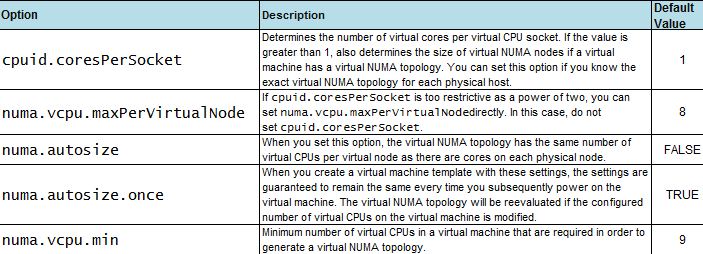
When CPU affinity is enable on a virtual machine, it´s treated as a NON-NUMA client and gets excluded from NUMA scheduling. It means that the NUMA scheduler will not set a memory affinity for the virtual machine to its current NUMA node and the VMkernel can allocate memory from every available NUMA node in the system. It wil increase memory latency and probabbly the value %RDY will get higher.

An example how NUMA (or vNUMA) works:

With NUMA enable, the Virtual Machine will get vCPU from the same NUMA node (it is, from the same socket)
But.... what´s about the best practices?
1-NUMA-nodes: take your time and the sockets features carefully because some physical cpu´s are composed with 2 underlying sockets. For example some ADM opteron wich have sockets with 12 cores are composed inside with 2 sockets and 6 cores each. It is, a server with 4 sockets 12 cores each.... are a 8 NUMA nodes and not 4.
2-The "default" config on a new VM is "cores per socket" equal to 1, it means that vNUMA is enabled and let the virtual topology to present the best performance to the VM.
3-If the number of "cores per socket" needs to be changed (for licensing purposes for example) the vNUMA will not apply the best config to the VM and will affect to performance. Only you choose a right combination with the vCPUs and cores per socket mirroring the physical NUMA topology on your server (review your NUMA-nodes config)
4-Cluster and DRS or vMotion: "One suggestion is to carefully set the cores per virtual socket to determine the size of the virtual NUMA node instead of relying on the size of the underlying NUMA node in a way that the size of the virtual NUMA node does not exceed the size of the smallest physical NUMA node on the cluster. For example, if the DRS cluster consists of ESXi hosts with four cores perNUMA node and eight cores perNUMA node, a wide virtual machine created with four cores per virtual socket would not lose the benefit of vNUMA even after vMotion. This practice should always be tested before applied. (VMware transcript) "
But.... what´s about the best practices?
1-NUMA-nodes: take your time and the sockets features carefully because some physical cpu´s are composed with 2 underlying sockets. For example some ADM opteron wich have sockets with 12 cores are composed inside with 2 sockets and 6 cores each. It is, a server with 4 sockets 12 cores each.... are a 8 NUMA nodes and not 4.
2-The "default" config on a new VM is "cores per socket" equal to 1, it means that vNUMA is enabled and let the virtual topology to present the best performance to the VM.
3-If the number of "cores per socket" needs to be changed (for licensing purposes for example) the vNUMA will not apply the best config to the VM and will affect to performance. Only you choose a right combination with the vCPUs and cores per socket mirroring the physical NUMA topology on your server (review your NUMA-nodes config)
4-Cluster and DRS or vMotion: "One suggestion is to carefully set the cores per virtual socket to determine the size of the virtual NUMA node instead of relying on the size of the underlying NUMA node in a way that the size of the virtual NUMA node does not exceed the size of the smallest physical NUMA node on the cluster. For example, if the DRS cluster consists of ESXi hosts with four cores perNUMA node and eight cores perNUMA node, a wide virtual machine created with four cores per virtual socket would not lose the benefit of vNUMA even after vMotion. This practice should always be tested before applied. (VMware transcript) "
Suscribirse a:
Entradas (Atom)