
Mostrando entradas con la etiqueta HP. Mostrar todas las entradas
Mostrando entradas con la etiqueta HP. Mostrar todas las entradas
30 enero 2014


09 octubre 2013
Do you know what NUMA is? really? - Part 2
Once we have clear the NUMA concept, let´s go review the use on VMware.
( Part 1/2 http://virtualshocks.blogspot.com.es/2013/09/dou-you-kow-what-numa-is-really-part-1.html )
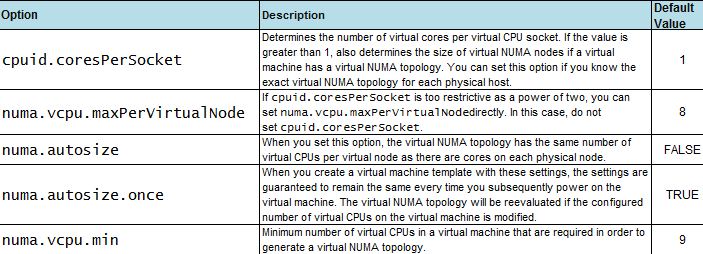
NUMA topology is avaliable on VMware vSphere 5.0 and later, hardware version 8 and later, and it´s enable by default when the virtual CPU is greater than 8, but it can be disabled or modify using advanced options (to enable vNUMA on 8 way or smaller VMs, modify the numa.vcpu.min setting) :
When CPU affinity is enable on a virtual machine, it´s treated as a NON-NUMA client and gets excluded from NUMA scheduling. It means that the NUMA scheduler will not set a memory affinity for the virtual machine to its current NUMA node and the VMkernel can allocate memory from every available NUMA node in the system. It wil increase memory latency and probabbly the value %RDY will get higher.

An example how NUMA (or vNUMA) works:

With NUMA enable, the Virtual Machine will get vCPU from the same NUMA node (it is, from the same socket)
But.... what´s about the best practices?
1-NUMA-nodes: take your time and the sockets features carefully because some physical cpu´s are composed with 2 underlying sockets. For example some ADM opteron wich have sockets with 12 cores are composed inside with 2 sockets and 6 cores each. It is, a server with 4 sockets 12 cores each.... are a 8 NUMA nodes and not 4.
2-The "default" config on a new VM is "cores per socket" equal to 1, it means that vNUMA is enabled and let the virtual topology to present the best performance to the VM.
3-If the number of "cores per socket" needs to be changed (for licensing purposes for example) the vNUMA will not apply the best config to the VM and will affect to performance. Only you choose a right combination with the vCPUs and cores per socket mirroring the physical NUMA topology on your server (review your NUMA-nodes config)
4-Cluster and DRS or vMotion: "One suggestion is to carefully set the cores per virtual socket to determine the size of the virtual NUMA node instead of relying on the size of the underlying NUMA node in a way that the size of the virtual NUMA node does not exceed the size of the smallest physical NUMA node on the cluster. For example, if the DRS cluster consists of ESXi hosts with four cores perNUMA node and eight cores perNUMA node, a wide virtual machine created with four cores per virtual socket would not lose the benefit of vNUMA even after vMotion. This practice should always be tested before applied. (VMware transcript) "
But.... what´s about the best practices?
1-NUMA-nodes: take your time and the sockets features carefully because some physical cpu´s are composed with 2 underlying sockets. For example some ADM opteron wich have sockets with 12 cores are composed inside with 2 sockets and 6 cores each. It is, a server with 4 sockets 12 cores each.... are a 8 NUMA nodes and not 4.
2-The "default" config on a new VM is "cores per socket" equal to 1, it means that vNUMA is enabled and let the virtual topology to present the best performance to the VM.
3-If the number of "cores per socket" needs to be changed (for licensing purposes for example) the vNUMA will not apply the best config to the VM and will affect to performance. Only you choose a right combination with the vCPUs and cores per socket mirroring the physical NUMA topology on your server (review your NUMA-nodes config)
4-Cluster and DRS or vMotion: "One suggestion is to carefully set the cores per virtual socket to determine the size of the virtual NUMA node instead of relying on the size of the underlying NUMA node in a way that the size of the virtual NUMA node does not exceed the size of the smallest physical NUMA node on the cluster. For example, if the DRS cluster consists of ESXi hosts with four cores perNUMA node and eight cores perNUMA node, a wide virtual machine created with four cores per virtual socket would not lose the benefit of vNUMA even after vMotion. This practice should always be tested before applied. (VMware transcript) "
17 septiembre 2013
HP Smart Update Manager 6.0 (HP SUM 6)

User Guide:
http://www.hp.com/support/HP_SUM_UG_en
Technical White Paper:
http://h20195.www2.hp.com/V2/GetDocument.aspx?docname=4AA4-6947ENW&cc=us&lc=en
Download "HP Smart Update Manager version 6.00 - ISO":
http://h17007.www1.hp.com/us/en/enterprise/servers/products/service_pack/hpsum/index.aspx

11 septiembre 2013
Do you know what NUMA is? really? - Part 1
This post is about NUMA concept, because many people speaks about NUMA and don´t know "really" what is or how to use it.
By the way, NUMA is refered to the server platforms with more than one system bus and dedicates different memory banks to different processors.
See an example with 2 bus (2 sockets) which access to their own memmory banks internally and access the rest memmory banks when interleavng is disable on the BIOS :

Each CPU (socket) + local memory = NUMA node
In the past, there were servers with only one bus and the CPU was increased in Ghz more and more, and the memmory consumtion grow up; it´s teh cause nowadays the servers have more than one bus and you must install the memmory on banks pairing the bus.
If the memory is not populated correctly and distributed equally across the nodes the O.S. stop responding and display a purple screen (PSOD) with the following NUMA node error message:

In a NUMA architecture, processors may access local memory quickly and remote
memory more slowly. This can dramatically improve memory throughput as long as the data are
localized to specific processes (and thus processors). On the downside, NUMA
makes the cost of moving data from one processor to another, as in workload
balancing, more expensive. The high latency of remote memory accesses can leave the processors
under-utilized, constantly waiting for data to be transferred to the local node,
and the NUMA connection can become a bottleneck for applications with
high-memory bandwidth demands.
However, an advanced memory controller allows a node to use memory on all
other nodes, creating a single system image. When a processor accesses memory
that does not lie within its own node (remote memory), the data must be
transferred over the NUMA connection, which is slower than accessing local
memory. Memory access times are not uniform and depend on the location of the
memory and the node from which it is accessed, as the technology’s name
implies.
>Rank Interleaving. Every consecutive memory cache line (64 bits) is mapped to a different DIMM rank.
>Channel Interleaving. Every consecutive memory cache line is mapped to a different memory channel.

Memory interleaving refers to the way the system maps its memory addresses to the physical memory locations in the memory channels and DIMMs. Typically, consecutive system memory addresses are staggered across the DIMM ranks and across memory channels in the following manner:
>Channel Interleaving. Every consecutive memory cache line is mapped to a different memory channel.

disabling Node Interleaving = NUMA active
At least, NUMA options is only avaliable on Intel Nehalem and AMD Opteron
Next post "Part 2" will review the NUMA use on VMware.
09 septiembre 2013
The HP Power Advisor utility (free)
HP has created the HP Power Advisor utility that provides accurate and meaningful estimates of the power needs for HP ProLiant and Integrity servers. ´
The HP Power Advisor utility is a tool for calculating power use of the major components within a rack to determine power distribution, power redundancy, and battery backup requirements for computer facilities. Power Advisor allows you to configure each individual server or node. You can then duplicate the server configuration as often as necessary to populate an enclosure, and then duplicate it to populate a rack. The result is that you can build a complete data center quickly by duplicating a rack.
The HP Power Advisor utility is a tool for calculating power use of the major components within a rack to determine power distribution, power redundancy, and battery backup requirements for computer facilities. Power Advisor allows you to configure each individual server or node. You can then duplicate the server configuration as often as necessary to populate an enclosure, and then duplicate it to populate a rack. The result is that you can build a complete data center quickly by duplicating a rack.
Easy to install, easy to use (drag & drop), friendly interface....a great free tool!!!
Download link: http://sizers.houston.hp.com/sb/installs/HPPowerAdvisor.zip


24 enero 2012
#VMware #ESXi 5 updates
En este enlace teneis los ultimos updates (parches) de ESXi5 que afectan a detalles tan importantes como la conectividad de las mv´s Windows si estan configuradas sobre vlans en una plataforma HP-Flexfabric o IBM VFA... ahi es nada...
VMware ESXi 5.0, Patch Release ESXi500-201112001
| Updates esx-base |
ESXi500-201112401-SG
|
Security | Important |
|
Updates tools-light
|
ESXi500-201112402-BG
|
Bug Fix | Important |
|
Updates net-be2net
|
ESXi500-201112405-BG
|
Bug Fix | Low |
|
Updates misc-drivers
|
ESXi500-201112404-BG
|
Bug Fix | Low |
|
Updates net-e1000 and net-e1000e
|
ESXi500-201112403-SG
|
Security | Important |
17 diciembre 2010
Soporte para maquinas virtuales de 64bit en VMware vSphere (ESX/ESXi)
Para tener soporte de maquinas de 64bit en ESX o ESXi debemos configurar correctamente la BIOS y habilitar (enabled) el parametro Execute Disable , en caso de servidores HP, y No-Execute Memory Protection, en el caso de servidores Dell.
Tambien debemos habilitar el juego de instrucciones especificas para virtualizacion Virtualization Technology.
Dejar claro tambien que en ciertas configuraciones (determinadas placas, bios, etc) no es conveniente tener habilitados todos los parametros como para VMware FT, pero en lineas generales es recomendable habilitar VT y sobre todo Hyperthreading para aprovechar al maximo las vCPUs que tendremos (un socket quad core suponen 8 vCPUs en vSphere, pero no cofundamos con el doble de rendimiento, aproximandamente un 33% mas segun datos de Intel)
Enlaces conm videos demos de ambas tecnologias:
http://www.intel.com/business/resources/demos/xeon5500/performance/demo.htm
http://www.intel.com/technology/product/demos/vt/demo.htm
Tambien debemos habilitar el juego de instrucciones especificas para virtualizacion Virtualization Technology.
Dejar claro tambien que en ciertas configuraciones (determinadas placas, bios, etc) no es conveniente tener habilitados todos los parametros como para VMware FT, pero en lineas generales es recomendable habilitar VT y sobre todo Hyperthreading para aprovechar al maximo las vCPUs que tendremos (un socket quad core suponen 8 vCPUs en vSphere, pero no cofundamos con el doble de rendimiento, aproximandamente un 33% mas segun datos de Intel)
Enlaces conm videos demos de ambas tecnologias:
http://www.intel.com/business/resources/demos/xeon5500/performance/demo.htm
http://www.intel.com/technology/product/demos/vt/demo.htm
19 septiembre 2010
Nueva "HP Client Virtualization TCO tool"
HP lanza su nueva herramienta para calcular el TCO (Coste Total de Propiedad) de los equipos en funcion de los usos de los equipos de la empresa con VDI, HP Blade System Wokstation y SBC.


08 septiembre 2010
Comprobar garantia de HP, DELL y CISCO
Enlaces directos para verificar online la garantia de productos de la marca HP, DELL y CISCO
 HP: http://www13.itrc.hp.com/service/ewarranty/warrantyInput.do
CISCO: http://www.cisco-warrantyfinder.com/
DELL: http://support.euro.dell.com/support/topics/topic.aspx/emea/shared/support/my_systems_info/es/details?c=es&l=es&s=gen
Espero que os sea utiles, ahorran tiempo antes de llamar al fabricante para verificar si un equipo esta o no en garantia o si debemos buscar la factura porque la fecha de compra puede ser posterior a la caducidad de la garantia.

CISCO: http://www.cisco-warrantyfinder.com/
DELL: http://support.euro.dell.com/support/topics/topic.aspx/emea/shared/support/my_systems_info/es/details?c=es&l=es&s=gen
Espero que os sea utiles, ahorran tiempo antes de llamar al fabricante para verificar si un equipo esta o no en garantia o si debemos buscar la factura porque la fecha de compra puede ser posterior a la caducidad de la garantia.
Suscribirse a:
Entradas (Atom)