Mostrando entradas con la etiqueta Web Client. Mostrar todas las entradas

09 febrero 2014

New VMware Lab: VMware vSphere: Install, Configure, Manager 5.5

VMware Lab Connect™ is now available for VMware vSphere: Install, Configure, Manager [V5.5]. This is a cloud-based lab environment which includes all 24 labs from the VMware vSphere: Install, Configure, Manage [V5.5] course.  This self-paced lab environment is available for 30 days or 30 hours of active time.

http://mylearn.vmware.com/mgrreg/courses.cfm?ui=www_edu&a=one&id_subject=53128

You will have access hands-on lab practice on the following 24 labs: 

•  Lab 1 - Installing VMware vSphere GUIs
•  Lab 2 - Configuring VMware ESXi
•  Lab 3 - Working with Virtual Machines
•  Lab 4 - Configuring VMware vCenter Server Appliance
•  Lab 5 - Using the VMware vSphere Web Client
•  Lab 6 - Configuring VMware vCenter Single Sign-On
•  Lab 7 - Creating Folders in VMware vCenter Server
•  Lab 8 - Standard Switches
•  Lab 9 - Accessing iSCSI Storage
•  Lab 10 - Accessing NFS Storage
•  Lab 11 - Managing VMware vSphere VMFS
•  Lab 12 - Using Templates and Clones
•  Lab 13 - Modifying a Virtual Machine
•  Lab 14 - Migrating Virtual Machines
•  Lab 15 - Managing Virtual Machines
•  Lab 16 - Managing VMware vSphere vApps
•  Lab 17 - User Permissions
•  Lab 18 - Resource Pools
•  Lab 19 - Monitoring Virtual Machine Performance
•  Lab 20 - Using Alarms
•  Lab 21 - Using VMware vSphere High Availability
•  Lab 22 - Configuring VMware vSphere Fault Tolerance
•  Lab 23 - VMware vSphere Distributed Resource Scheduler
•  Lab 24 - VMware vSphere Update Manager

01 octubre 2013

vSphere Web Client login error: Failed to connect to VMware Lookup Service. SSL certificate verification failed (vCenter Appliance)

Si al hacer login desde el Web Client de vSphere nos encontramos con este error "Filed to connect to VMware Lookup Service https://ip:7444/lookupservice/sdk - SSL certificate verification failed.":


Nada tan sencillo como conectarnos a la consola de la VMware vCenter Server Appliance y poner en yes la opción de regenerar certificados desde la pestaña "Admin" > "Toggle certificate setting" > "Certificate regeneration enabled" > "yes":


Lanzamos un reboot desde la pestaña "System":


y ya podemos conectarnos sin problema:


...y volia!


14 marzo 2013

New Veeam Plug-in for the vSphere 5.1 Web Client

Nuevo plugin de Veeam para el vSphere Web Client.... recordad que vSphere 5.1 es la ultima version que dispondra de vSphere Client , es mas, muchas funciones ya solo se pueden encontrar si nos conectamos por web al vCenter.

04 septiembre 2012

Adios vSphere Client. Hola vSphere Web Client.

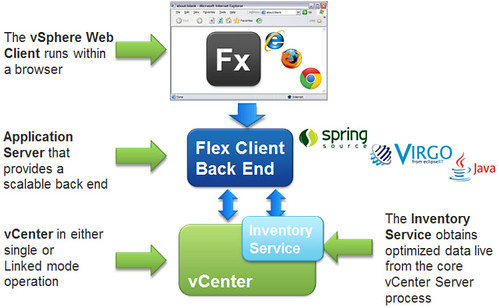
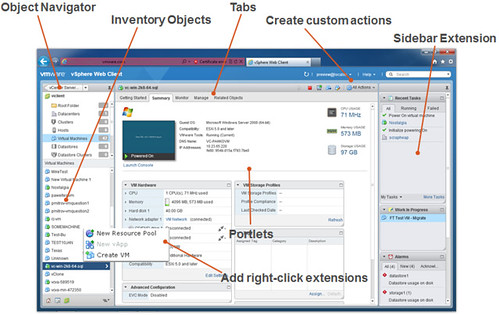
VMware vSphere 5.1 sera la ultima version con vSphere Client. La nueva version incluye un nuevo Web Client que se convertira en el estandar de conexion para VMware apoyado en las nuevas caracteristcias de single sign-on.


El nuevo plug-in de conexion podra utilizarse con iExplorer, Firefox y Chrome. 


.